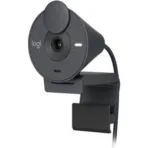
Logitech Brio 305 Webcam 1080p Full HD

KSh 7,500.00

Logitech Brio 305 Webcam 1080p Full HD

Logitech Brio 305 Webcam 1080p Full HD
Key Features
Brand: 
Logitech
Up to Full HD
 1080p Resolution at 30 fps
70° Diagonal
 Field of View
Auto Focus, 
Glass Lens
Mono Noise
-Reducing Mic
RightLight 2 
Auto-Light Correction
Integrated 
Privacy Shutter
Includes 
Mount Clip
USB Type-C 
Connection
Works with Logi
 Tune Software
Windows, Mac, and
 Chrome Compatible

Description

Product Description

Logitech Brio 305 Webcam 1080p Full HD
Key Features
Brand: 
Logitech
Up to Full HD
 1080p Resolution at 30 fps
70° Diagonal
 Field of View
Auto Focus, 
Glass Lens
Mono Noise
-Reducing Mic
RightLight 2 
Auto-Light Correction
Integrated 
Privacy Shutter
Includes 
Mount Clip
USB Type-C 
Connection
Works with Logi
 Tune Software
Windows, Mac, and
 Chrome Compatible

Overview of Logitech Brio 305 Webcam

The Logitech Brio 305 Webcam is designed to deliver crystal-clear video and audio, making it ideal for professional and personal use. Key features include:

  • Ultra HD 4K Resolution: Experience stunning video clarity with 4K resolution, ensuring every detail is captured.
  • HDR Technology: High Dynamic Range (HDR) adjusts to changing lighting conditions, providing the best possible image quality.
  • Autofocus and Digital Zoom: Automatically focuses on the subject and offers up to 5x digital zoom for close-ups.
  • Noise-Canceling Microphones: Dual microphones reduce background noise, ensuring clear audio during calls and recordings.
  • Privacy Shutter: Built-in privacy shutter for added security when the webcam is not in use.
  • Wide Field of View: Adjustable field of view settings (65°, 78°, and 90°) to suit different needs.

Why Choose the Logitech Brio 305 Webcam?

  1. Superior Video Quality: The 4K Ultra HD resolution ensures that your video calls, recordings, and live streams are of the highest quality.
  2. Advanced Lighting Adjustment: With HDR technology, the Brio 305 adapts to various lighting conditions, so you always look your best.
  3. Professional Audio: Dual noise-canceling microphones make sure your voice comes through clearly, free from background distractions.
  4. User-Friendly Design: Easy to set up and use, with features like the privacy shutter adding convenience and security.
  5. Versatile Compatibility: Works seamlessly with popular video conferencing platforms like Zoom, Microsoft Teams, and Google Meet.

Tips for Using Logitech Brio 305 Webcam

  1. Optimal Lighting: Ensure you have good lighting in your room to complement the HDR feature.
  2. Stable Internet Connection: For the best video call experience, make sure your internet connection is stable.
  3. Proper Placement: Position the webcam at eye level for the most flattering angle.
  4. Regular Updates: Keep your webcam firmware and software updated to benefit from the latest features and improvements.
  5. Privacy Shutter: Use the privacy shutter when the webcam is not in use to protect your privacy.