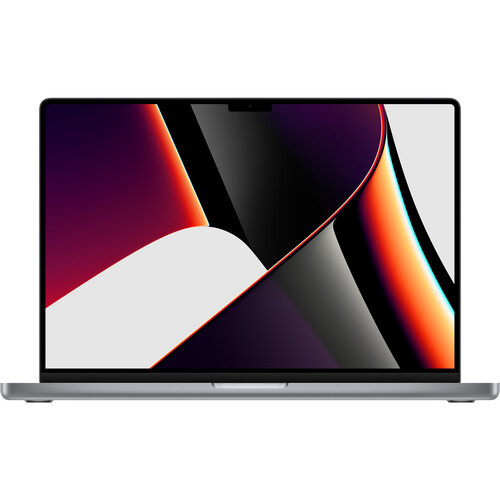


Apple 16.2″ MacBook Pro with M1 Max Chip
KSh 579,999.00
- Apple M1 Max 10-Core Chip
- 64GB Unified RAM | 1TB SSD
- 16.2″ 3456 x 2234 Liquid Retina XDR Screen
- 32-Core GPU | 16-Core Neural Engine
- Wi-Fi 6 (802.11ax) | Bluetooth 5.0
- Thunderbolt 4 | HDMI | MagSafe 3
- SDXC Slot | FaceTime HD 1080p Camera
- Backlit Magic Keyboard
- Force Touch Trackpad | Touch ID Sensor
- macOS
Apple MacBook Pro 16″ M1 Max Late 2021 Overview
Built for all types of creatives, including developers, photographers, filmmakers, 3D artists, music producers, and more, the Apple 16.2″ MacBook Pro with M1 Max Chip is the ultimate pro mobile workstation for the ultimate user.
The system features the Apple M1 Max 10-Core Chip, which provides the power and performance needed to handle your professional workflows. The 16.2″ Liquid Retina XDR display features a 3456 x 2234 resolution, 1,000 nits of sustained brightness, 1,600 nits of peak brightness, P3 color gamut support, and more. With up to 1TB of SSD storage, you’ll be able to load massive files and launch apps quickly, enabling you to work with photo and video libraries from almost anywhere. Buy The Apple 16.2″ MacBook Pro with M1 Max Chip Best Price Online from CELLULAR KENYA,Nairobi
Related products


Apple 13.3″ MacBook Pro M1 Chip with Retina Display 256GB
Buy via WhatsApp- Apple M1 8-Core CPU
- 16GB Unified RAM | 256GB SSD
- 13.3" 2560 x 1600 IPS Retina Display
- 8-Core GPU | 16-Core Neural Engine
- P3 Color Gamut | True Tone Technology
- Wi-Fi 6 (802.11ax) | Bluetooth 5.0
- Touch Bar | Touch ID Sensor
- 2 x Thunderbolt 3 / USB4 Ports
- Magic Keyboard | Force Touch Trackpad
- macOS